
Resume.org’s AI Resume Builder


- What Is Resume.org's AI Resume Builder?
- How the AI Resume Builder Works
- Why Use an AI Resume Builder?
- Key Features That Set Resume.org Apart
- Built-In Resume Tips and Content Suggestions
- ATS-Friendly Formatting and Keyword Support
- Who Should Use Resume.org’s Builder?
- Tailored Suggestions Based on Your Target Job
- Build and Edit on Any Device
- Resume.org vs. Other Resume Tools
- FAQs
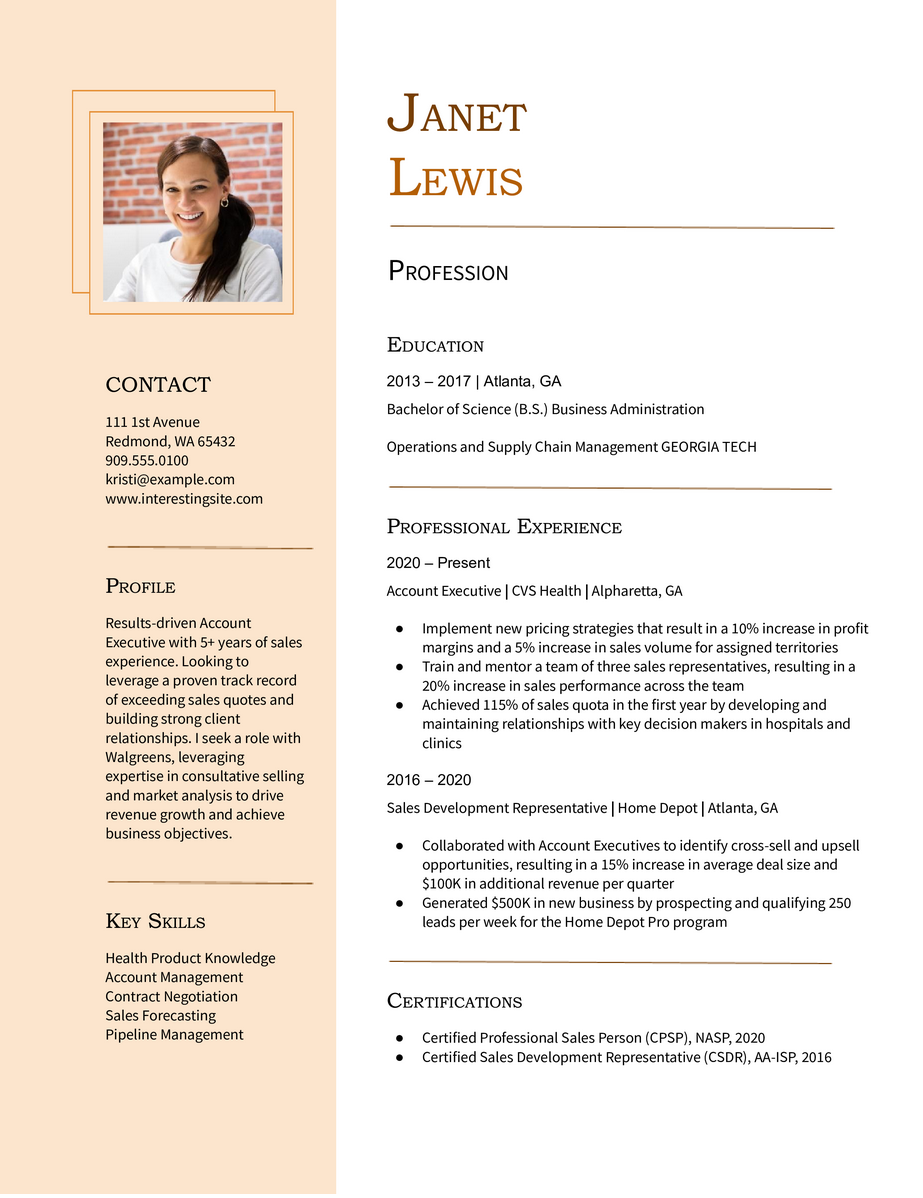
Creating a resume doesn’t have to be complicated or time-consuming. Resume.org’s AI Resume Builder is designed to make resume writing fast, accurate, and tailored to your target job, even if you’re starting from scratch. Powered by smart technology and user-friendly tools, this platform helps job seekers create custom resumes that meet both recruiter expectations and applicant tracking system (ATS) requirements.
Let’s explore what makes Resume.org’s AI tool stand out, how to use it effectively, and why it’s a game-changer for modern job seekers.
What Is Resume.org's AI Resume Builder?
A smarter way to build a resume
Resume.org’s AI Resume Builder is a free online tool that helps users create resumes using AI. It guides you through each section, recommends content based on your experience and the job you’re targeting, and even suggests phrasing optimized for industry-specific roles.
Rather than relying on generic templates, the AI adapts to the job title, career level, and keywords in real time. Whether you’re writing your first resume or updating an old one, this builder eliminates guesswork.
Explore the AI Resume Builder here to get started in under five minutes.
How the AI Resume Builder Works
Step-by-step, user-friendly design
You don’t need to be a tech expert to use this tool. The resume builder works in a guided flow:
- Choose your career level and job title
- Select a professional template
- Answer quick prompts about your background
- Let the AI generate text for each section
- Customize and download your resume instantly
The system supports multiple industries and job types, offering flexible templates and language that can be adjusted for tone and detail.
Want to test different layouts? Try several free resume templates without starting over.
Why Use an AI Resume Builder?
Save time and improve accuracy
Traditional resume writing can take hours — and many people still struggle to highlight their experience effectively. AI tools streamline that process by providing:
- Targeted phrasing that matches job descriptions
- Real-time suggestions for keywords and formatting
- Professional tone suited to your career level
- ATS optimization to improve visibility in hiring systems
Instead of spending time trying to “sound impressive,” the AI helps you focus on substance — measurable results and relevant strengths.
Key Features That Set Resume.org Apart
Customization without complexity
Unlike some resume tools that offer rigid templates, Resume.org gives you more control while still guiding you through the process. Here’s what stands out:
- Industry-specific phrasing
- One-click resume summaries generated for your target job
- Dynamic formatting so you don’t have to worry about alignment or spacing
- Instant editing for experience, skills, and achievements
You can explore sample resumes by profession to see how these features come together in action.
Built-In Resume Tips and Content Suggestions
Guidance as you go
Not sure how to phrase your last job description or what skills to include? Resume.org’s AI tool offers real-time suggestions to guide your decisions. When you enter a job title, the system pulls from a database of common responsibilities and skills — but still lets you edit freely.
This is especially helpful for job seekers who:
- Are unsure how to describe their past roles
- Need help writing a resume with no experience
- Are transitioning careers and want transferable skills highlighted
For first-timers, check out this resume-writing guide before using the builder to maximize your results.
ATS-Friendly Formatting and Keyword Support
Beat the bots and get noticed
ATS are used by most companies to screen resumes. If your formatting is too complex or missing the right keywords, you might never get seen by a human recruiter.
Resume.org’s builder solves this by:
- Using clean, ATS-compatible layouts
- Embedding job-specific keywords based on your target title
- Avoiding graphics and design elements that confuse ATS software
Need an example of what works? Use this modern resume template built specifically for ATS success.
Who Should Use Resume.org’s Builder?
It’s for more than just entry-level job seekers
The platform supports a range of job seekers, including:
- Students and new grads who need a simple, guided tool
- Mid-career professionals updating older resumes
- Career changers who need help translating transferable skills
- Job seekers returning to work after a break
Whether you’re applying for internships or executive roles, Resume.org’s smart builder adapts to your needs and saves time.
Tailored Suggestions Based on Your Target Job
Get content that matches real job descriptions
One of the most powerful features of Resume.org’s AI Resume Builder is its ability to adapt to the job you’re applying for. When you enter a specific job title, such as “Project Manager” or “Sales Associate,” the AI analyzes real-world job descriptions to recommend relevant skills, action verbs, and summary content.
This level of personalization ensures that your resume aligns closely with hiring manager expectations and the language used in ATS. You don’t have to guess which keywords to include; the builder guides you in real time.
This helps avoid the common mistake of submitting generic resumes. If you’re not sure what to aim for, browse some real-world resume examples to see how targeted language improves clarity and impact.
Build and Edit on Any Device
Access your resume builder from desktop or mobile
Resume.org’s AI Resume Builder is fully responsive, so you can create or edit your resume from a desktop, tablet, or smartphone — no software downloads needed. Whether you’re on your laptop at home or updating your resume on the go, you’ll have access to all your content and templates.
You can start a resume on your phone, switch to your computer for deeper editing, and export it in minutes. This is especially helpful for job seekers who are applying to roles across multiple platforms like LinkedIn, Indeed, or company career portals.
Want to keep multiple versions handy? The builder makes it easy to save different formats for various roles or industries — giving you flexibility without starting from scratch.
Resume.org vs. Other Resume Tools
Why choose Resume.org?
While there are several AI resume tools out there, Resume.org stands out because of its:
- Free access to high-quality resume creation
- Simple interface that’s beginner-friendly
- No login required to start building
- Real-time AI content suggestions instead of just blank fields
It’s also updated regularly to reflect the latest hiring trends and recruiter expectations — no outdated advice or rigid formats.
For a quick comparison, visit the AI Resume Builder page and test it side-by-side with other platforms.
FAQs
Yes. The resume builder is completely free to use, including unlimited access to templates and AI-generated content. There’s no hidden paywall for downloading or exporting your resume. You can also make edits and try different versions without starting from scratch.
The builder provides smart suggestions, but you remain in full control. You can rewrite, delete, or expand any part of the resume — including summaries, job descriptions, and skills. This flexibility ensures that your resume still reflects your personal voice and experience.
Yes. The AI is designed to handle non-linear work histories. You can input freelance work, education gaps, or career shifts, and the tool will help reframe your experience with language that emphasizes transferable value. Also, you can explore resume tips for career changers for more guidance.

Resume.org offers free, HR approved resume templates to help you create a professional resume in minutes. Choose from several template options and even pre-populate a resume from your profile.